
Install Ingress-Nginx via Cluster Plugin
Ingress-Nginx Cluster Plugin has been deprecated. Please use the ingress-nginx-operator instead.
TOC
OverviewInstallationConfiguration ManagementUpdating ConfigurationCommon Configuration ScenariosExposing via LoadBalancerMetalLB IntegrationAdvanced Controller Deployment SettingsSSL PassthroughIPv6 Single-Stack SupportPerformance TuningResource Allocation GuidelinesSmall Scale (< 300 QPS)Medium Scale (< 10,000 QPS)Large Scale (< 20,000 QPS)High Performance (Unlimited)Important NotesLimitationsVersion CompatibilityRelated ResourcesOverview
The NGINX Ingress Controller is deployed as a cluster plugin in the cpaas-system namespace. This guide covers installation, configuration, and best practices for managing the Ingress NGINX Controller in your Kubernetes cluster.
Installation
- Navigate to
Administrator -> Marketplace -> Cluster Plugin - Locate the Ingress NGINX plugin and click
Install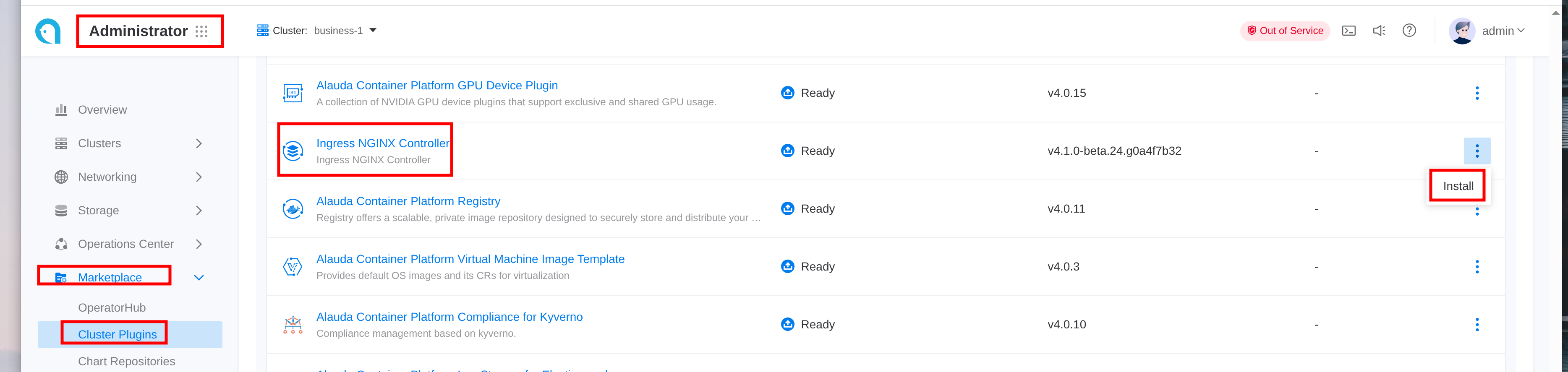
Configuration Management
Updating Configuration
- Configure kubectl to use the global cluster context
- Retrieve the ModuleInfo name for your cluster:
- Edit the ModuleInfo configuration:
The
spec.configsection corresponds to the Ingress NGINX Helm chart values.
Common Configuration Scenarios
Exposing via LoadBalancer
To expose the Ingress Controller using a LoadBalancer service:
MetalLB Integration
To specify LoadBalancer VIP when using MetalLB:
Advanced Controller Deployment Settings
Configure network mode, replicas, resource limits, and node selection:
SSL Passthrough
Enable SSL passthrough functionality:
IPv6 Single-Stack Support
Configure for IPv6-only environments:
Performance Tuning
Resource Allocation Guidelines
Small Scale (< 300 QPS)
Medium Scale (< 10,000 QPS)
Large Scale (< 20,000 QPS)
High Performance (Unlimited)
For maximum performance with no CPU limits:
Important Notes
Limitations
- Only one Ingress NGINX Controller instance is supported per cluster
Version Compatibility
Current version mapping: ACP Ingress-NGINX 4.1.x corresponds to the official chart 4.12.2 (controller v1.12.3)
Related Resources
tasks for ingress-nginx
official Ingress NGINX chart
official Ingress NGINX documentation